With prediction markets reaching $44 billion in 2025 volume, technical traders need sophisticated charting tools, but major platforms offer vastly different capabilities that could make or break trading strategies. For traders looking to get started, understanding prediction market app download iOS Android options is crucial before evaluating charting features.
- Kalshi offers basic charting but lacks advanced technical indicators
- Polymarket provides candlestick charts but limited drawing tools
- Robinhood Predictions focuses on mobile-first charting with simplified interfaces
- Technical traders should test platform charting before committing capital
- Mobile charting capabilities vary significantly across platforms
What Charting Tools Do Prediction Market Apps Actually Offer?

Technical traders require specific charting capabilities to execute profitable strategies in prediction markets. The available chart types, time frames, and analytical tools vary dramatically across platforms, creating a significant gap between what traders need and what platforms provide.
Chart Types Available: Candlestick vs Line vs Bar Charts
Candlestick charts are the gold standard for technical analysis, showing open, high, low, and close prices in a single visual representation. Polymarket leads with full candlestick chart support, while Kalshi offers only basic line charts that limit technical analysis capabilities. Robinhood Predictions provides simplified bar charts optimized for mobile viewing but lacks the depth needed for advanced pattern recognition.
The absence of candlestick charts on Kalshi represents a major limitation for traders who rely on candlestick patterns like doji, hammer, and engulfing patterns to identify market reversals. Line charts, while useful for basic trend identification, cannot capture the price action detail required for sophisticated trading strategies.
Time Frame Options: From 1-Minute to Weekly Charts
Time frame flexibility is crucial for traders operating across different strategies. Polymarket offers the most comprehensive range, supporting 1-minute, 5-minute, 15-minute, 1-hour, 4-hour, daily, and weekly charts. This allows day traders to execute scalping strategies while swing traders can analyze longer-term trends on the same platform.
Kalshi limits users to daily and weekly charts only, making it unsuitable for active trading strategies that require intraday analysis. Robinhood Predictions focuses on 1-hour and daily charts, optimized for mobile users but restricting technical analysis capabilities for traders who need shorter time frames.
Technical Analysis Features: Which Platforms Support Advanced Indicators?
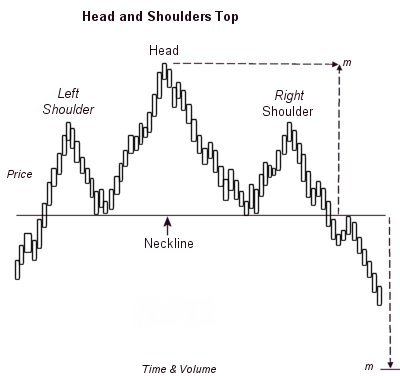
Advanced technical indicators separate professional traders from casual participants. The availability of built-in indicators and drawing tools determines whether a platform can support sophisticated trading strategies.
Built-in Technical Indicators: RSI, MACD, and Moving Averages
Polymarket stands out with 12 built-in technical indicators including RSI for momentum analysis, MACD for trend strength, and multiple moving averages for support/resistance identification. Traders can customize indicator parameters and overlay multiple indicators simultaneously for comprehensive market analysis.
Kalshi offers only 3 basic indicators: simple moving average, volume, and price change percentage. This severe limitation forces traders to perform manual calculations or use external tools, significantly hampering their ability to execute technical strategies efficiently.
Robinhood Predictions provides 5 mobile-optimized indicators including RSI and two moving averages, but lacks advanced indicators like MACD, Bollinger Bands, or stochastic oscillators. The mobile-first approach sacrifices analytical depth for simplicity.
Drawing Tools and Annotation Capabilities
Drawing tool capabilities vary significantly across platforms. Polymarket offers comprehensive annotation tools including trend lines, horizontal support/resistance levels, Fibonacci retracements, and text annotations. Traders can save their drawings and apply them across different markets for consistent analysis.
Kalshi provides only basic trend line drawing with no support for Fibonacci tools or advanced annotations. The platform’s focus on regulatory compliance appears to limit its technical capabilities, creating a frustrating experience for traders accustomed to professional charting platforms.
Robinhood Predictions offers touch-optimized drawing tools designed for mobile use, including simple trend lines and price level markers. However, the lack of precision tools and inability to save drawings makes it difficult to maintain consistent analysis across trading sessions.
Mobile vs Desktop Charting: How Do Prediction Market Apps Compare?
The mobile trading experience has become essential for prediction market participants, but desktop platforms still offer advantages for serious technical analysis. Understanding the trade-offs between mobile and desktop charting helps traders choose the right platform for their needs.
Mobile Charting Experience: Touch Controls and Screen Optimization
Mobile optimization is where Robinhood Predictions excels, offering intuitive touch controls that make chart navigation seamless on smartphones. Swipe gestures allow quick time frame changes, pinch-to-zoom provides detailed price analysis, and the interface automatically adjusts to different screen sizes and orientations. The platform’s focus on prediction market app user interface design principles makes it particularly accessible for beginners.
Polymarket’s mobile app provides full desktop charting capabilities in a mobile interface, maintaining all technical indicators and drawing tools. However, the complexity can overwhelm mobile users, and the smaller screen size makes detailed analysis challenging without constant zooming and panning.
Kalshi’s mobile experience focuses on simplicity over functionality, offering basic chart viewing but limited interaction capabilities. The platform’s regulatory constraints appear to restrict mobile feature development, resulting in a subpar experience for technical traders who need mobile access.
Desktop Charting Advantages: Screen Space and Multi-Monitor Support
Desktop platforms offer significant advantages for technical analysis. Polymarket’s desktop interface supports multi-monitor setups, allowing traders to view multiple charts simultaneously while monitoring news feeds and executing trades. The larger screen real estate enables detailed analysis of complex chart patterns and indicator overlays. Many traders also rely on prediction market app watchlist features to track their favorite markets across different devices.
Keyboard shortcuts on desktop platforms accelerate the trading workflow, with hotkeys for adding indicators, changing time frames, and placing trades. Polymarket provides comprehensive keyboard support, while Kalshi and Robinhood Predictions offer limited desktop functionality.
Screen customization on desktop platforms allows traders to arrange charts, watchlists, and trade execution panels according to their preferences. This flexibility is essential for developing efficient trading workflows that maximize analytical capabilities while minimizing execution time.
The most counter-intuitive finding is that despite the $44 billion market size, prediction market apps lag significantly behind traditional trading platforms in charting sophistication. The specific action step is to test each platform’s charting tools using a demo account before depositing funds, focusing on whether the charting capabilities match your technical analysis trading style. Security should also be a priority, as understanding prediction market app security features can protect your trading capital.